Category: rtcamp

Daily notes at rtcamp

  • day 42

    • Dashboard widgets
    • Adding widget
    • Rewrite API intro

    Dashboard Widgets

    By default there are some widgets on the dashboard like welcome , at a glance , activity , site health etc.

    Like almost everything else in WordPress, the dashboard is also extensible. We can add our own widgets and display them in the dashboard.

    Widgets are basically meta boxes that we can display info into or collect info from. Like a widget that gives info of site views etc.

    How to add new widgets?

    The dashboard widget API provides us with a function wp_add_dashboard_widget(), Using it we can add our own widget in the dashboard.

    I have created this widget that fetches some quotes from the endpoint https://type.fit/api/quotes , then randomly generated an index and displays the quote in the dashboard widget.
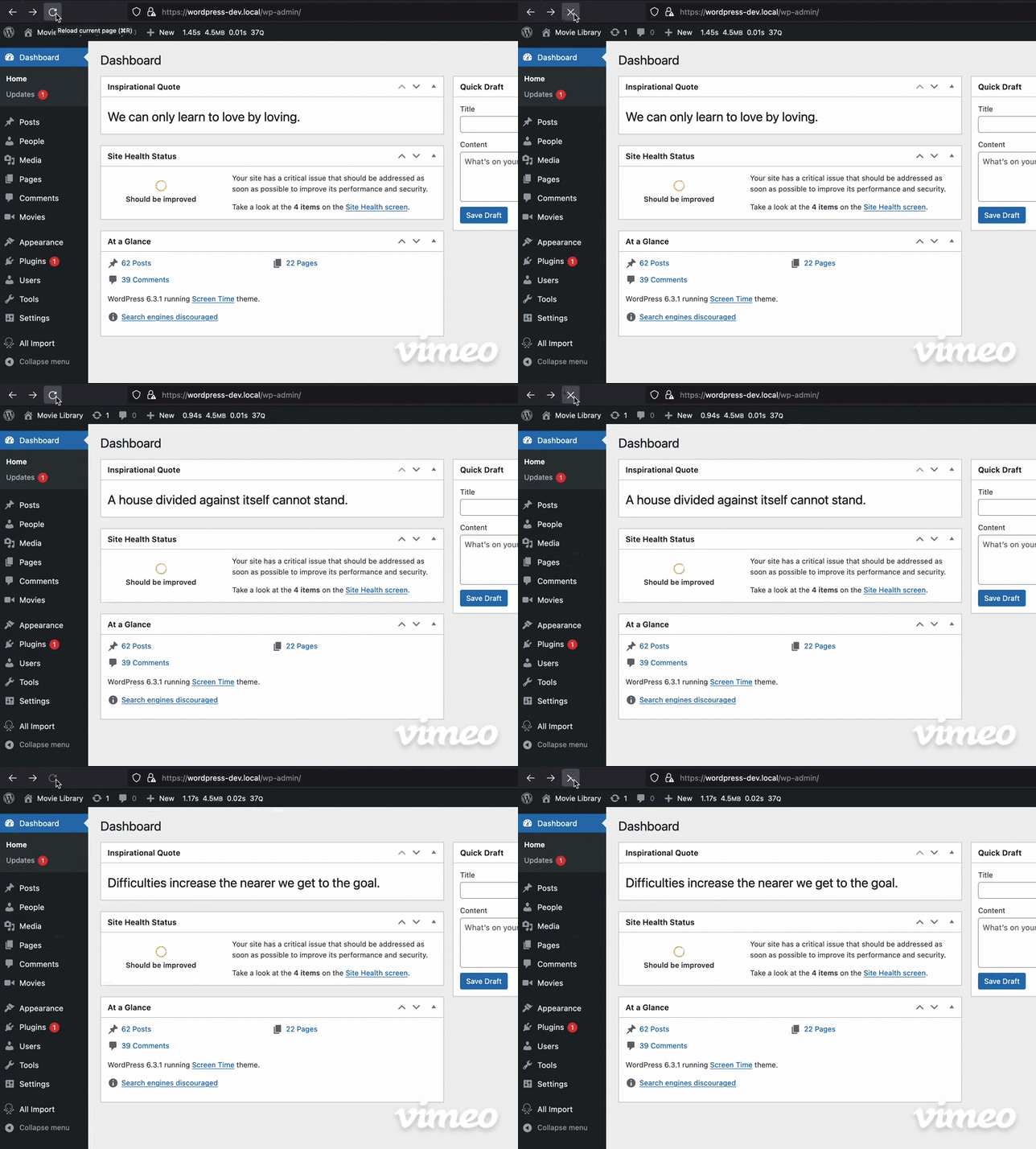
    Below is the code I used for this:-

    public function __construct() {
    		add_action('wp_dashboard_setup', array($this, 'register_dashboard_widgets'));
    	}
    
    	public function register_dashboard_widgets(){
    		wp_add_dashboard_widget('daily_quote', 'Inspirational Quote', array($this, 'daily_quote_widget_callback'));
    	}
    
    public function daily_quote_widget_callback(){
            $url = 'https://type.fit/api/quotes';
            $response = wp_remote_get($url, array('headers' => array('Accept' => 'application/json')));
            $body = json_decode(wp_remote_retrieve_body($response));
    		$random_index = random_int(0, count($body)-1);
    		$quote = '<h1>' . esc_html($body[$random_index]->text) .'</h1>' ;
    		echo $quote;
        }
    

    Rewrite API intro

    The wordpress rewrite api allows us to specifiy new rewrite rules. It has below functions:-

    • add_rewrite_rule()
    • add_rewrite_tag()
    • add_rewrite_endpoint()

    Rewriting is used so we can create pretty links like /best-movies-2023 which will be then mapped with the actual resource.

    This same post you can access using https://pratiklondhe.wordpress.com/?p=799 but it doesn’t look good and search engines also penalize us for this url. We can use the rewrite rules for that so the same post can be accessed at https://pratiklondhe.wordpress.com/2023/09/06/day-42/


  • day 41

    Making HTTP requests from wordpress ?

    We can make HTTP requests like GET,POST and HEAD using the helper functions in core.

    The methods we can use are in the http.php file.

    • wp_remote_get()
    • wp_remote_post()
    • wp_remote_head()

    We can use this methods to make the respective requests

    // The GET
    
     $url = 'http://getit.local/wp-json/';
     $response = wp_remote_get($url);
    
     echo '<pre>'; 
     print_r($response);
     echo '</pre>';


    This will make GET request and return the response

    There are also some helper functions to get only the body or only some specific header

    • wp_remote_retrieve_body()
    • wp_remote_retrieve_response_code()
    • wp_remote_retrieve_header()
    wp_remote_retrieve_body()
    • retrieves the body of the response
     $url = 'http://getit.local/wp-json/';
     $response = wp_remote_get($url);
     $body = wp_remote_retrieve_body($response);
    
    wp_remote_retrieve_response_code()
    • Retrieves the response code
     $url = 'http://getit.local/wp-js0n/';
     $response = wp_remote_get($url);
     $response_code = wp_remote_retrieve_response_code($response);
     if(200 !== $response_code){
    	echo __('Might be some issue');
     }
    

    We can get all the headers or a specific header, for that we can use wp_remote_retrieve_header() or wp_remote_retrieve_headers() to get the headers as array


    Transient API

    In wordpress transient api can be used to cache the data in a standard way and for a specific time frame.

    These API methods are in the option.php file, as the transient is just using the options API with timed expiration.

    We can get and set the transient, we have to use a unique identifier for that.

    • get_transient()
    • set_transient()
    • delete_transient()

    Also, if we are in a multisite setup and want the transient to be accessible network wide we can use the site_ methods

    • get_site_transient()
    • set_site_transient()
    • delete_site_transient()
    $url = 'https://api.github.com/users/pratik-londhe4';
    $response = wp_remote_get($url);
    $body = wp_remote_retrieve_body($response);
    set_transient('github-user', $body, 60);
    
    $user = get_transient('github-user');
    echo '<pre>';
    print_r($user);
    echo '</pre>';
    

    Code to test the transient api.

    We can set the expiration of the transient as the thir argument, we can use seconds or there are constants that we can use to define the time.

    • MINUTE_IN_SECONDS
    • HOUR_IN_SECONDS
    • DAY_IN_SECONDS
    • WEEK_IN_SECONDS
    • MONTH_IN_SECONDS
    • YEAR_IN_SECONDS