- Core Web Vitals
What are Core Web Vitals
Core Web Vitals are metrics used to measure real-world user experience for loading performance, interactivity, and visual stability of the page.
The Core Web Vitals Include metrics like
- LCP: Largest Contentful Pain.
- FID: First Interaction Delay.
- CLS: Cummulative Layout shift
We can use tool lighthouse to measure this things
- Install the npm CLI tool Lighthouse
npm install -g lighthouse- Run it to test for your site url
lighthouse https://pratiklondhe.dev/ --viewwe are using –view so the HTML report is opened immediately
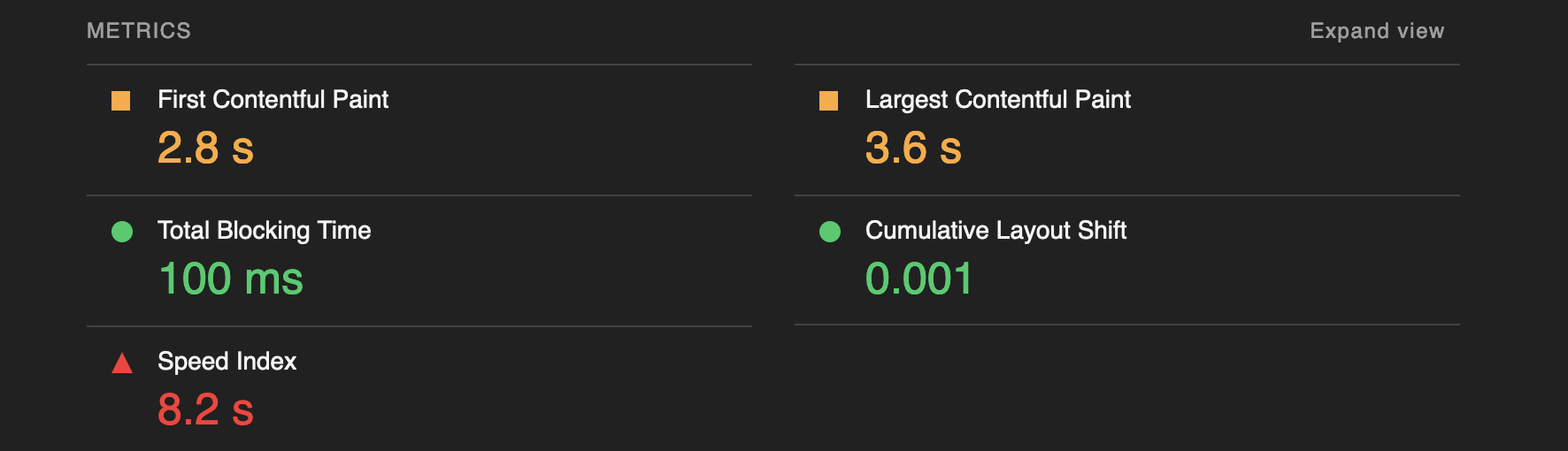
SEO (Search Engine Optimization)
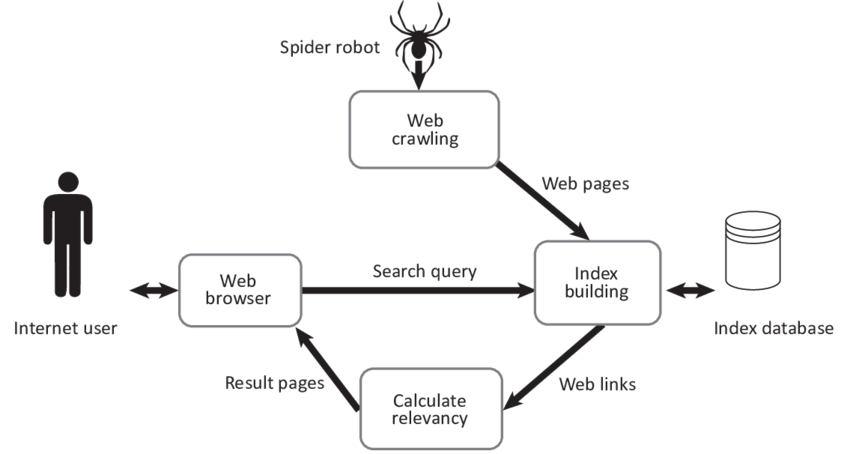
The Google search engine uses index to store info about the sites on the internet so that when user searches something the results can be served.
Many sites get added everyday, for this to work Google uses crawlers to access the content of the site and analyses it to store in the index.
Key Concepts in SEO
- Index – Google stores the pages that it knows in a database known as an index.
- Crawl – It is a process of going through the site to get information and data about the site.
- Crawler – It is an automated software used for Crawling
- Googlebot – Name of the Google Crawler
- SEO – Search engine optimization: the process of making your site better for search engines.
structured data or schema
We can define a structured markup for our web page to let the Search Engines know about the type of content we are serving like News, Article, Recipe, Music, Movie, Video, etc.
We can do that using 2 formats
- JSON-LD
- MicroData
The JSON-LD format (JSON for Linking Data) is a method of encoding linked data using JSON, as it is based on JSON which is human readable and also serializable.
  <script type="application/ld+json">
    {
      "@context": "https://schema.org",
      "@type": "NewsArticle",
      "headline": "Title of a News Article",
      "image": [
        "https://example.com/photos/1x1/photo.jpg",
        "https://example.com/photos/4x3/photo.jpg",
        "https://example.com/photos/16x9/photo.jpg"
       ],
      "datePublished": "2015-02-05T08:00:00+08:00",
      "dateModified": "2015-02-05T09:20:00+08:00",
      "author": [{
          "@type": "Person",
          "name": "Jane Doe",
          "url": "https://example.com/profile/janedoe123"
        },{
          "@type": "Person",
          "name": "John Doe",
          "url": "https://example.com/profile/johndoe123"
      }]
    }
    </script>
The MicroData format is less popular, it uses the HTML tags and attributes to define the structure for the document
 <div itemscope itemtype="https://schema.org/NewsArticle">
      <div itemprop="headline">Title of News Article</div>
      <meta itemprop="image" content="https://example.com/photos/1x1/photo.jpg" />
      <meta itemprop="image" content="https://example.com/photos/4x3/photo.jpg" />
      <img itemprop="image" src="https://example.com/photos/16x9/photo.jpg" />
      <div>
        <span itemprop="datePublished" content="2015-02-05T08:00:00+08:00">
          February 5, 2015 at 8:00am
        </span>
        (last modified
        <span itemprop="dateModified" content="2015-02-05T09:20:00+08:00">
          February 5, 2015 at 9:20am
        </span>
        )
      </div>
      <div>
To valiadate this data we can use following applications
- https://developers.google.com/search/docs/appearance/structured-data
- https://validator.schema.org/
Leave a Reply