Author: Pratik Londhe

  • Monday

    • Reflecting on mistakes
    • Custom array serialization
    • Metadata API

    Reflecting on Mistakes


    I created one file as main plugin file and all other classes inside includes directory.

    movie-library/
    ├── movie-library.php
    └── includes/
        ├── movie.php
        └── person.php


    So I put everything related to movie like CPT, Taxonomies and metaboxes in the movie.php and for person.php did the same.

    This made the files hugs like about 1000 lines, which made it really hard to maintain all of that, so to fix it and make it more maintainable for me I spent some time to refactor everything and make the directory structure a little bit different.

    movie-library/
    ├── movie-library.php
    └── includes/
        ├── utils/
        ├── metaboxes/
        │   └── MovieMetaboxes.php
        ├── post-types/
        │   ├── Movie.php
        │   └── Person.php
        └── taxonomy/
            ├── MovieTaxonomy.php
            └── PersonTaxonomy.php
    

    This made the whole structure little bit more maintainable.

    Custom array serialization


    The custom meta boxes allow users to select multiple options at a time, they are sent as an array and need to be stored in the database.

    When I looke at the default serialization in WordPress, it is not much readable it looks like this

    a:2:{i:1;a:0:{}s:12:"_multiwidget";i:1;}
    

    Frankly this looks ugly, even though we will be getting the unserialized version of this.

    I wanted to store the array in string like format but also be able to retreive them into the array for that I used below format

    $arr = array(10,20,30);
    $serialized = '[10,20,30]';
    

    Then to retrive this string array, we have to

    • First remove the [ and ] from the string
    • Then Split the string by "," to get the array
    • After converting the array elements into integer values to display the selected we use strict equality.
    /**
    	 * Deserialize Array
    	 *
    	 * @param  mixed $string String retrieved from db.
    	 * @return array
    	 */
    	public static function deserialize_array( $string ) : array {
    
    		$string = trim( $directors, '[]' );
    		$arr    = explode( ',', $directors );
    		$arr    = array_map( 'intval', $directors );
    		return $arr;
    
    	}
    

    Metadata API


    Metadata API is simple and standard way to access metadata of an object in wordpress. Mostly we will use it to store metadata related to our Custom Post Types.

    • add_metadata()
    • delete_metedata()
    • update_metadata()
    • get_metadata()

    Metadata API is really useful to retrieve the metadata, also in our custom metaboxes we use function of this API to create new meta key and values pairs or update them when user creates or updated a movie post.
  • End of week 3

    • Publisher Subscriber Model
    • Singleton Pattern
    • Use yoda condition checks, you must

    Publisher Subscriber Model


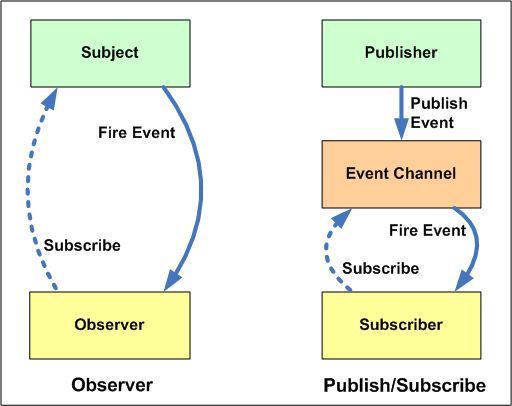
    The WordPress hooks loosely follow this architecture, When it used the do_action() function, it is publishing an event to which anyone can subscribe using add_action().
    The hooks system in WordPress is the base of the whole architecture as it allows us to hook into the WordPress events and extend them, the filters even allow us to modify the data which is really cool

    Singleton Pattern


    We are using OOP to code our plugin, the other way is to do it in functional way. Functional programming may seem convinient at start but as the code base becomes larger and larger it is difficult to maintain all those functions and finding unique names for them.

    The main plugin file we used singleton pattern as it will be used only once and no need to create its instances again and again.

    It makes sure that when we are taking instance of the main class, we are getting the same instance every time.

    I will make sure that to use this only once at the entry point of plugin, as overusing the singleton pattern is not a good idea

    <?php
    if ( ! defined( 'ABSPATH' ) ) {
    	exit; // Exit if accessed directly.
    }
    
    require_once 'includes/Movie.php';
    require_once 'includes/Person.php';
    
    /**
     * Plugin Name: Movie Library Plugin
     * Description: Plugin for movie library
     * Plugin URI: tr.rt.gw
     * Author: Pratik
     * Text Domain: movie-library
     */
    class MovieLibraryPlugin {
    	private static $instance = null;
    
    	/**
    	 * Private Constructor to implement Singleton pattern
    	 */
    	private function __construct() {
    		register_activation_hook( __FILE__, array( __CLASS__, 'activate' ) );
    		register_deactivation_hook( __FILE__, array( __CLASS__, 'deactivate' ) );
    
    		/**
    		 * Register the custom post types and taxonomies under rt-movie
    		 */
    		$movie = new Movie();
    		$movie->register();
    
    		/**
    		 * Register the custom post types and taxonomies under Person
    		 */
    		$person = new Person();
    		$person->register();
    
    	}
    
    	/**
    	 * Get the instance of the class
    	 *
    	 * @return MovieLibraryPlugin
    	 */
    	public static function get_instance(): MovieLibraryPlugin {
    		if ( null === self::$instance ) {
    			self::$instance = new self();
    		}
    
    		return self::$instance;
    	}
    
    	/**
    	 * Do tasks when activating the plugin
    	 *
    	 * @return void
    	 */
    	public static function activate() {
    		// Functionality to activate the plugin goes here.
    		flush_rewrite_rules();
    	}
    
    	/**
    	 * Do tasks when deactivating the plugin
    	 *
    	 * @return void
    	 */
    	public static function deactivate() {
    		// Functionality to deactivate the plugin goes here.
    	}
    
    
    	public static function uninstall() {
    		// Clean up the plugin
    	}
    }
    
    MovieLibraryPlugin::get_instance();


    Use yoda condition checks, you must


    The Yoda conditions programming style (or “Yoda notation”) inverts the variable and constant, literal, or function in an equality conditional expression.

    This how we typically write conditions :

    public static function get_instance(): MovieLibraryPlugin {
    		if ( self::$instance === null ) {
    			self::$instance = new self();
    		}
    
    		return self::$instance;
    	}


    Using Yoda conditions

    public static function get_instance(): MovieLibraryPlugin {
    		if ( null === self::$instance ) {
    			self::$instance = new self();
    		}
    
    		return self::$instance;
    	}


    This was really helpful for me as I sometimes write my if condition like

    if ( $message = null)
    

    this will assign null to the $message instead of using comparison

  • Internationalization

    • internationalization
    • WordPress Flow
    • Translations wrapper functions
    • gettext hook

    Internationalization is the process of making our plugins/themes ready to be translated into other languages.

    POT, PO and MO files

    POT (Portable Object Template ) file

    • POT file is used as starting point for translations
    • It contains all the original strings that need to be translated in other languages

    PO (Portable Object) file

    • The PO file contains the actual translations from the template files

    MO (Machine Object) file

    • MO file is generated by compiling the PO File.
    • It is optimised to be used in actual translations

    WordPress Flow


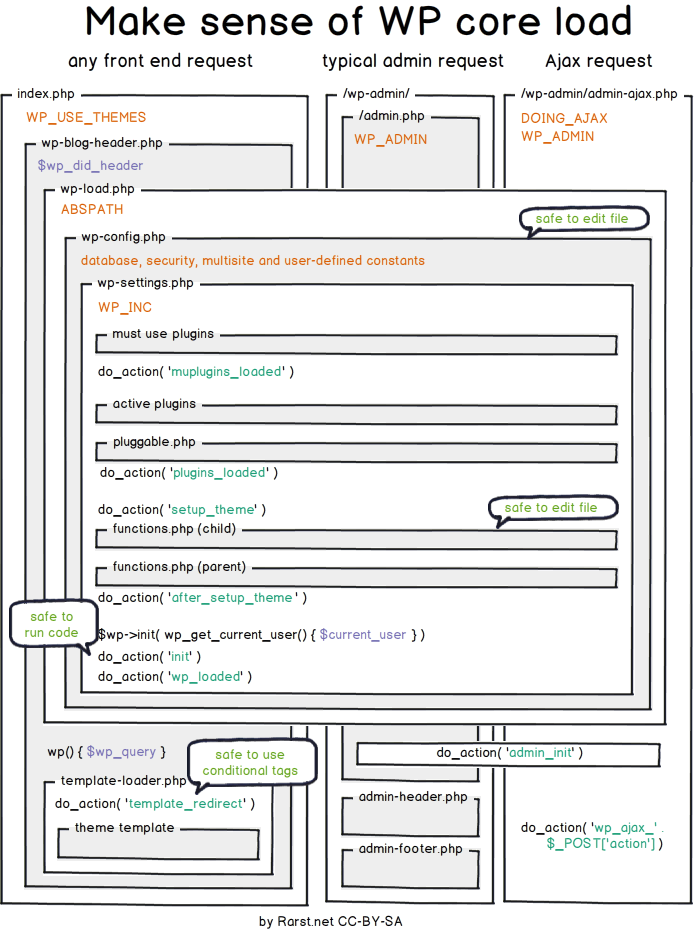
    I got through the wordpress core files to learn how exactly the files are run one by one, like how the wordpress flow works to better understand the actions and filters.

    1. Index.php file is entry point when an user visits the WordPress blog
    2. After index.php wp-blog-header.php is loaded. This file loads the wp-load.php file to load the wordpress
    3. Then it moves to loading template-loader.php
    4. the template loader redirects to the template and emits template-redirect action

    __() , _e() functions in i18n


    In order to make a string translatable in your application you have to just wrap the original string in a __() function:

    __( 'Hello, dear user!', 'movie-library' );
    

    If your code should echo the string to the browser, use the _e() function instead:

    _e( 'Watch from here', 'movie-library' );
    

    gettext hook


    The gettext filter is used to translate the strings in our plugin

    function my_text_strings( $translated_text, $text, $domain ) {
    	switch ( $translated_text ) {
    		case 'Salman' :
    			$translated_text = __( 'Bhai!', 'movie-library' );
    			break;
    	}
    	return $translated_text;
    }
    add_filter( 'gettext', 'my_text_strings', 20, 3 );


  • Custom post types


    In WordPress, we have inbuilt post types like post, pages, attachments, revisions and changesets.

    All of these post types are stored in the table posts. Wordpress allows us to create our own post types and also to extend its functionality like we can create a post type for movies etc.

    To create a new custom post type we use register_post_type() function

    function mlb_custom_post_type() {
    	register_post_type('Movie',
    	  array(
    		'labels' => array(
    			'name'=> __('Movies','textdomain'),
    	'singular_name' => __('Movie','textdomain'),
    			),
    	);
    }
    add_action('init', 'mlb_custom_post_type');


    This will register a new post type Movie which will be created at init hook.

    Taxonomies

    What are taxonomies in WordPress, it is just a way for classification of things like we use tags and categories.

    We can aslo create our own custom taxonomies like for our movies we can categorize them in different genres

    function mlb_register_taxonomy_genre()
    {
        $labels = array(
            'name'=> _x( 'Genres', 'taxonomy general name' ),
    		 'singular_name'=> _x( 'Genre', 'taxonomy singular name' ));
    
    $args = array(
    		 'hierarchical'   => false
    		 'labels'         => $labels,
    		 'show_ui'        => true,
    		 'rewrite'        => [ 'slug' => 'genre' ],
    	 );


    Creating custom post types and taxonomies is the WordPress way of extending its functionality however we want without ever having to touch its core files.

  • Basic plugin development

    • Hooks
    • actions and filters

    Hooks in wordpress

    in wordpress, when some point in the execution is going on a hook is emitted like when the user created a new post or when the user logs out.

    We can write code that will be attached to these hooks and executed when hooks are called.

    There are two types of hooks in wordpress

    1. Action hook
    2. Filter hook

    Action Hooks

    Action hook let’s us do something when the hook gets called.

    For example we can remove all data of our plugin when the uninstall action is called.

    Action hooks are defined using

    do_action( 'action_name', [optional_arguments] );
    

    We can then execute some code by attaching a function to this action hook

    add_action('action_name' , 'function_name');
    
    function function_name()
    {
        //do stuff
    }
    

    Filter Hooks

    Filter hooks are used to modify the data. So we can pass the data to our custom filter, modify it and then return the modified data.

    To apply a filter,

    $message = apply_filter('message' , $message)
    

    And then we can attach our custome function to filter the message

    add_filter('message' , 'filter_message');
    
    function filter_message( $message )
    {
        return $message . "modified";
    }
    

    The filter hooks will always get some data sent to them and will have to return some data. The actions may or may not get data and only need to do some tasks.

  • Coding standards

    • Rules vs Standards
    • PHP code sniffer
    • Plugins : the first step

    Rules vs Standards


    When we are writing code, we are making something that will be used by other people. As we go on writing code, it becomes a huge mess if everyone just wrote whatever they want however they want as long as it works.

    To stop this from happening and make code readable and manageable we follow some rules while writing code. Rules may be like using tabs instead of spaces for indentation or using camel case for naming functions etc.

    There are many rules we can follow, but if in a large group of people, everyone is following those rules it becomes a standard. The standard that is followed within an organization or by a small group of developers or a huge community of open source devs.

    When writing PHP code, to enforce the standards we use PHP code sniffer

    PHP Code Sniffer

    We can set custom standards to be followed and the PHP code sniffer detects in our code where we have violated them. PHPCS can detect standards violations in CSS and JS also but in WordPress we use it only for PHP as there are other tools for those languages too.

    We can install multiple standards like for WP VIP, for WP core etc


    Plugins : the first step

    After learning how to use WordPress, we are going to learn how to extend its functionality using plugins.

    one huge rule for WordPress : Never touch the core

    There can be incredible things to be done without ever having to touch the core of WordPress. We can extend the functionality of our WordPress using plugins.

    How to create a plugin ?

    • Go into wp-contents/plugins
    • You can create plugins even using just one php file
    • create a php file : plugin-name.php
    • To make this file interpreted as a plugin we have to put a header doc in the php
    /*
     * Plugin Name:       Test
     * Plugin URI:        https://example.com/plugins/the-basics/
     * Description:       Testing if this works
     * Version:           1.0.0
     * Requires at least: 6.2
     * Requires PHP:      7.2
     * Author:            Pratik Londhe
     */
    
  • Learning how to use wordpress

    • Block Editor
    • Plugins : make life easier
    • Widgets
    • Read the Docs

    I had never thought from the perspective of a primitive user trying to put his blogs on the internet having no knowledge in coding or anything.

    WordPress has made it very easy to build the site we want, the way we want it to be with little to no knowledge in coding.

    What exactly is a website, even if we are trying to build something very unique its building blocks are already there. We can even create a full e commerce site and manage it using WordPress.

    Gutenberg Block Editor

    We can create posts and pages for our site using the block editor, it has almost everything we need to design a site. We can also extend the blocks available using plugins and themes.

    Everything is made up of blocks, this paragraph, the image you see below

    If you have some knowledge of coding you can even customize it more to your liking but mostly it is not necessary for many use cases.


    Plugins

    For our assignment, had to add a subscription form and contact us form in our site. Used NinjaForm Plugin to do that in minutes, just had to design the form and use its shortcode in the Gutenberg editor to put it on the site.

    Plugins do really make it easier for us to do things on our sites, want the functionality of a social media site?, use BuddyPress. Want to create an e-commerce site? use WooCommerce, want to filter spam comments use Akismet.

    Widgets

    Widgets are components that add some functionality to your site, like a search widget that will allow users to search through content of your site, or a widget that makes call to an api and fetches latest movie ratings.

    Widget to list all your posts or to select a date from calendar, all this features can be added with minimum to no code using widgets to out site.

    Read The Docs

    Its always better to read the documentation of the product you are using. Yeah, it is good if you learn by doing but knowing some things beforehand really makes it easy.


    Summary:

    Had a productive week, learned a lot of things (most of them from mistakes!).

  • Day 9 at rtcamp

    • Mysql Events
    • Sending mail over SMTP in php
    • Worpress Multisite Network
    • User Roles in wordpress

    MySQl Events:

    I had shifted the dbless mail verification to database finally, but now how to automatically expire the records after few minutes. This is where I learned about mysql events.

    MySQL Events are tasks that run according to a schedule, we can create events to be scheduled to run every 5 minutes or at a specific time.

    DELIMITER //
    create EVENT delete_verification_tokens
    ON SCHEDULE EVERY 1 MINUTE
    DO
    BEGIN
      DELETE FROM verification
      WHERE addedAt < NOW() - INTERVAL 2 MINUTE;
    END;
    //
    DELIMITER ;
    

    this will delete rows from verification table that are 2 minutes older.

    You can read more about MySQL events from here


    Sending mails over SMTP in php


    I wanted to test my application if it really works or not, I was using mailhog to capture the mails sent and read them from there.

    the default mail() function in php does not support SMTP authentication so we are going to use an external library for this:

    phpMailer:

    • install it using composer require phpmailer/phpmailer
    <?php
    use PHPMailer\PHPMailer\PHPMailer;
    use PHPMailer\PHPMailer\SMTP;
    use PHPMailer\PHPMailer\Exception;
    require '../vendor/autoload.php';
    require 'SubscribersDatabase.php';
    require 'EmailController.php';
    
    $database = new SubscribersDatabase();
    
    $emails = $database->getAllEmails();
    if (!$emails) {
        die();
    }
    $emailController = new EmailController();
    foreach ($emails as $email) {
        $mail = new PHPMailer(true);
        $mail->SMTPDebug = SMTP::DEBUG_SERVER;
            $mail->isSMTP();
            $mail->Host       = 'host';
            $mail->SMTPAuth   = true;
            $mail->Username   = 'username';
            $mail->Password   = 'password';
            $mail->SMTPSecure = PHPMailer::ENCRYPTION_STARTTLS;
            $mail->Port       = 587;
            $mail->setFrom('pratik@githubtimeline.local', 'Admin');
            echo $email;
        $mail->addAddress($email);
        $subject = "Github Timeline Updates";
        $message = $emailController->getUpdateMail();
        $headers[] = "MIME-Version: 1.0";
        $headers[] = "Content-type: text/html";
        $mail->isHTML(true);                                  //Set email format to HTML
        $mail->Subject = $subject;
        $mail->Body    = $message;
        $mail->send();
    }
    

    To get a free 300mails/day SMTP acoount you can signup on to Brevo


    WordPress Multisite

    We can create multuple files using same wordpress installation, this feature is called wordpress multisite. We can manage separate websites from same dashboard.

    Multisite allows us to manage plugins and themese differently for different sites added, we can also add site admins for different sites and delegate the site management to them

    User Roles in WordPress

    • Below roles can be applied to users:
      • Subscriber
      • Contributor
      • Author
      • Editor
      • Administrator
    • Subscriber
      • can read posts
      • can access their profile
    • Contributor
      • can edit posts and delete posts
    • Author
      • Create new posts, publish them, edit posts, delete posts
      • can upload files
    • Editor
      • publish new pages and posts
      • edit and delete pages and posts
      • manage categories
      • upload files
    • Administrator
      • manage plugins and themes
      • manage users
      • manage files
      • manage posts and pages
      • delete site
    • When we are using multisite super admin role is there, super admin can:
      • manage sites
      • manage network

    Overall wordpress is a really powerfull tool that we can use to create our own sites having little to no knowledge about coding websites. The marketplace has plenty of themes and plugins that we can choose from, if we don’t like them we can create our own using block editor.

  • day 8,

    • Removing a file from all git history
    • Custom Template Engine : overkill or not?
    • Emulating single page web app

    Removing file from git history


    Forgot to add a file to .gitignore and commited the changes?, well even if you delete it in next commit, anyone can see that file in the commit history.

    If the file contains some sensitive information and you pushed the repo to public, it is going to be hard time for you, as removing the file becomes near impossible if anyone has already cloned the repo.

    What to do now?, well change all the credentials exposed in the file, remove the file from future commits.

    If you still want to remove the file from history you can checkout this gihthub official doc : https://docs.github.com/en/authentication/keeping-your-account-and-data-secure/removing-sensitive-data-from-a-repository


    Custom Template Engine


    In our php assignment, we had to take email from user, send him verification link, send updates, let him un-subscribe. In all this, we had a form with one input field and one button.

    Initially, I created different php pages for each of these operations. I was not really happy with this arrangement as the code became so complex for me to manage.

    I have worked with django framework before and it has this functionality using which we can embed python variables and few directives inside the html.

    I just wanted to come up with something like that, after research (just googling things) I found this huge 1000 slides presentation that was presented by james bannet in pycon , the video is here .

    I didn’t watch the whole of it only when he explained how the django internally renders template, and decided to make one for my own project.

    <?php
    /**
     * Very Simple Template Engine
     *
     */
    class TemplateEngine
    {
        public function render($template_name, $context = null)
        {
            //find the file
            //get the file as string
            $template = file_get_contents("templates/" . $template_name);
    
            //if context is null no need to render, just return
            if (!$context) {
                return $template;
            }
    
            //get the tags that start {{ and end with }}
            $pattern = "/{{\s([^{}\s]+)\s}}/";
            preg_match_all($pattern, $template, $matches, PREG_PATTERN_ORDER);
    
            //create dictionary of patterns and variables
            $patternsMatched = $matches[0];
            $variableNames = $matches[1];
            $matches = array_combine($patternsMatched, $variableNames);
    
            // replace tags with data from the context
            foreach ($matches as $pattern => $var) {
                $template = str_replace($pattern, $context[$var], $template);
            }
    
            //return the template as string
            return $template;
        }
    }
    
    ?>


    This is the whole code, with only function to render the html template.

    This is how it works :

    • It takes tow parameters : name of the template and context
    • The context variable should have all the data necessary for the template
    • The regular expression finds all special tags like {{ email }} , then it iterates thorough all of them replacing the tags with their actual value from the context variable.

    example usage :

    // template file
    <form action="{{ action }}"
    method="POST"
    class="form-center">
    <h3> {{ header }} </h3>
    
    <input type="email"
         name="email"
         required id="email" >
         <br>
    <input type="submit" value="{{ btn }}" class="btn">
    </form>
    
    
    //php code to render it on webpage 
    
    $context["action"] = "unsubscribe.php";
                $context["header"] = "Unsubscribe to Github Timeline Updates";
                $context["btn"] = "Unsubscribe";
                $unsubscribeForm
                   = $templateEngine->render(
                    "email-form.html",
                    $context
                );
                echo $unsubscribeForm;
    

    Using this introduced many bugs in the code and had to refactor the whole application again.


    Emulating single page web app

    Why create separate files for each user action when there are very few operations to be performed.

    • Subscribe
    • Unsubscribe

    To emulate like this is all happening on the index.php , I used url parameter to convey the index page what to display now.

     /*
        * To emulate single page functionality,
        * forms are rendered conditionally
        * using my custom TemplateEngine
        */
        if (isset($_GET["flow"]) && $_GET["flow"]) {
            $flow = $_GET["flow"];
            switch ($flow) {
            case "enter otp":
                $otpForm = $templateEngine->render("enter-otp.html", "");
                echo $otpForm;
                break;
            case "subscribe":
                $subscribeForm = $templateEngine->render("subscribe-form.html");
                echo $subscribeForm;
                break;
    
            case "unsubscribe":
                $context["action"] = "unsubscribe.php";
                $context["header"] = "Unsubscribe to Github Timeline Updates";
                $context["btn"] = "Unsubscribe";
                $unsubscribeForm = $templateEngine->render(
                    "email-form.html",
                    $context
                );
                echo $unsubscribeForm;
                break;
    
            case "sent verification":
                echo "<p>Please check your email for verification link!</p>";
                break;
            }
        } else {
            echo $templateEngine->render("welcome-form.html");
        }
    

    Why used “” in the first two pages instead of context ?

    PHP doesn’t support method overloading like java does, it is not straightforward to mimic method overloading in PHP.


  • WordPress : posts, pages

    • Git Stages
    • How to add Content to wordpress
    • How to create new posts and pages
    • Creating Child pages

    Git Stages


    There are 3 stages in git

    1. Untracked : The filed is not being tracked by git
    2. Staged : The files has been added to git but the changes are not committed yet
    3. Committed : changes are commited
    • By running git status in terminal we get status of our current directory, (a git repo must be initialised before using git init).
      It shows info like which files are not tracked, which files are staged

    • You can add files to staging area using git add [filename] or git add . to add all files

    • Finally we commit the changes we have made and also put a message explaining what we did and why we did it using

      • git commit -m "message"

    How to add content to wordpress


    wordpress is a CMS(content management system), we can create posts on it and publish them as our daily blog, or use for documentation of our software or even create a portfolio for ourselves showcasing our skills.

    Two ways to add content to wordpress :

    1. creating pages
    2. Creating posts

    Pages: We create pages to display content that is not going to change or rarely change on our site, like a home page for our site.

    Posts: Posts are for sharing updates, like writing blogs and are time relative, we keep creating new posts to update our site.


    Creating new posts and pages in wordpress

    (more…)