Author: Pratik Londhe

  • day 26

    404 page

    If we try to access something that is unavialalbe we are greeted with a 404 page on any site.
    But in wordpress, if we have not created a 404 page explicitly, according to template hierarchy it just shows the index page. It is necessary to have a 404 page for good user experience

    get_search_form() function :

    This function can be used to spawn a search form for wordpress anywhere in our site.
    We can use this in our 404 page, instead of having to create the search form manually.

    <div>
    	<h1><?php esc_html_e("Page Not Found! Maybe try searching?"); ?></h1>
    
    
    <?php
    get_search_form();
    
    ?>
    
    </div>
    

    wp_dropdown_languages() function :

    We can use this function to spawn a select input with all the available languages. It doesn’t look that great but maybe useful to look at its code and see how wordpress processes the language selection This is how it looks in my site.

    The Slider

    The slider component in the theme was complex for me to write code for.
    We can use a mix of CSS and js to show the posters dynamically.
    This is the ugly version of the script I am using to display one slide.

    jQuery(document).ready(function (){
    	const slides = document.getElementsByClassName('the-slide');
    	slides[0].classList.add('active');
    });


    Grids, grids everywhere:-

    Grids in css are a great way to create layout for your site. I have used grid to spawn the movie cards in home page.
    Here is how to create a grid of 3 columns

    
    <style>
    .grid{
    display: grid;
    grid-template-columns: : 1fr 1fr 1fr;
    }
    

    Creating layouts, flexboxes are also used. We can combine both grids and flexboxes, nest them and create some good layouts.

    git : Working on multiple branches at the same time?, don’t forget to check you are on correct branch before commiting.

    How to temporarily save changes and then checkout to other branch (stash)
    $ git stash

    then

    $ git switch the-other-branch

    Once done there you can come back to your earlier branch and get the change by using

    $ git stash apply

  • end of week 5

    Adding custom font to css

    @font-face {
        font-family: big-shoulder;
        src: url('assets/fonts/BigShouldersDisplay.ttf');
    }
    
    .content{
        background-color: rgb(31,31,31);
        font-family: big-shoulder
    }
    

    Home page and Front Page

    • home page is index of our blogs. it’s list of our blogs in reverse chronological order.
    • front page is what users see at home of your site, you can set it to show the index or a static page.

    How to use metadata of post in the loop

    <p>
        <?php echo get_post_meta(get_the_ID(), 'rt-movie-meta-basic-release-date', true); ?>
    </p>
    <p>
        <?php echo get_post_meta(get_the_ID(), 'rt-movie-meta-basic-content-rating', true); ?>
    </p>
    <p>
        <?php echo the_terms(get_the_ID(), 'rt-movie-genre')[0]->name ?>
    </p>
    

    How to register menu locations in theme?

     register_nav_menus(
            array(
            'header-menu' => __('Header Menu'),
            'footer-menu-1'  => __('Footer Menu 1'),
            'footer-menu-2' => __('Footer Menu 2'),
            )
        );
    

    Using it in template

     <div class="secondary-menu-container">
            <?php wp_nav_menu(['menu'=>'footer-menu-2']); ?>
        </div>
    

    Namespace naming standards

    • camelcase
      • example : theMovieLibrary
    • upper camelcase/ pascal case
      • example : TheMovieLibrary

    3 ways to reset wp_query, which one to use where?

    1. rewind_posts() : not modifying the query just want to reset the post at begin
    2. wp_reset_query() : Using wp_reset_query() restores the WP_Query and global $post data to the original main query. You MUST use this function to reset your loop if you use query_posts() within your loop.
    3. wp_reset_postdata : Use wp_reset_postdata() when you are running custom or multiple loops with WP_Query. This function restores the global $post variable to the current post in the main query. If you’re following best practices, this is the most common function you will use to reset loops.

  • approaching theme development….

    • Things covered today
    • Where to begin

    Things Covered Today


    The loop:

    • We don’t have to query again to get posts because the main query almost always has the data we require.
    • To loop through this we use below code
    <?php
    if(have_posts()){
      while(have_posts()){
    the_post() //update the global post
    echo the_title();
    } //endwhile
    }else{
    echo "Sorry, no post found";
    }
    

    Why the the_post() is required ? well I forgot to call it and the while loop become infinite. This function sets up the next post in the loop so if we don’t call it then we will go into infinite loop.

    Can we have multiple loops?

    • Yes, on a page we may have a use case to create multiple loops to access the posts like on home page we want to show trending and upcoming both posts. For that we can use multiple loops and also custom query.
    • Here is a good example of how to use multiple loops:-
    <?php
    // Start the main loop
    if ( have_posts() ) :
        while ( have_posts() ) : the_post();
            the_title();
        endwhile;
    endif;
    
    // Use rewind_posts() to use the query a second time.
    rewind_posts();
    
    // Start a new loop
    while ( have_posts() ) : the_post();
        the_content();
    endwhile;
    ?>
    

    ! It is important that we reset the posts after each loop, without it will give unexpected results.

    Here are 3 ways we can reset the post query
    1. using rewind_posts()
    2. using wp_reset_postdata()
    3. using wp_reset_query()

    Template tags that can be used inside loop

    the_author()
    the_category()
    the_content()
    the_excerpt()
    the_ID()

    Common Conditional Tags for templates

    is_home()
    is_admin()
    is_page()
    is_single()
    is_author()

    Well we are almost 10% there to start building our theme so let’s begin.

    Where to begin?


    We are now equipped with some knowledge on how themes work in WordPress and now it is time to build one for our assignment.

    For people like me who don’t like fron-tend much here’s how I apporach:-

    • Look at the codebase of themes already built
      • the twentytwnety theme series is a good start to look at how the themes code look like
    • Start with just a button
      • Sometimes we hate to do something because we haven’t tried it for long enough.
      • Start with just a button, make it to your liking and build from there.
    • Start writing HTML
      • Just start writing some HTML, use the template tags and conditionals in WordPress to maybe just list the titles of the post and take it further from there.

    For reference Here’s how my index.php and style.css looks now:

    <?php
    while (have_posts()){
    	the_post();
    	the_post_thumbnail([40,40]);
    	the_title('<h2>', '</h2>');
    	the_excerpt();
    
    }
    ?>
    
    /*
    Theme Name: Screen Time
    Description: Theme for managing movies.
     */
    
    body{
        background-color: rgb(255,105,180);
        color: black;
        margin: 0px;
    }
    

  • day 23, themes

    • functions.php
    • Common template tags
    • Creating a page template

    functions.php file

    The functions.php file inside any theme directory can be used to write code that is necessary for the theme like enqueuing styles and scripts.

    We can also load our textdomain in this file, and add theme support. Below is a sample functions.php file that loads the textdomain

    <?php
    /**
     * Function to set up the screen time theme.
     */
    function screen_time_setup(){
    //Make theme available for translation
    	load_theme_textdomain( 'screen-time', get_template_directory() . '/languages' );
    }
    ?>
    

    we can hook this function into the ‘after_theme_setup’ hook

    add_action( 'after_setup_theme', 'screen_time_setup' );


    Common Template Tags

    1: get_header() : loads header template

    2: get_footer(): loads footer template

    3: get_sidebar(): loads sidebar template

    …wait, I am not going to list all tags here, here is how you can find the general tags by yourself

    Open public directory of your site, inside that go to “wp-includes” directory and find “general-template.php”, this files has all the general tags with nice documentation

    Creating Page Template

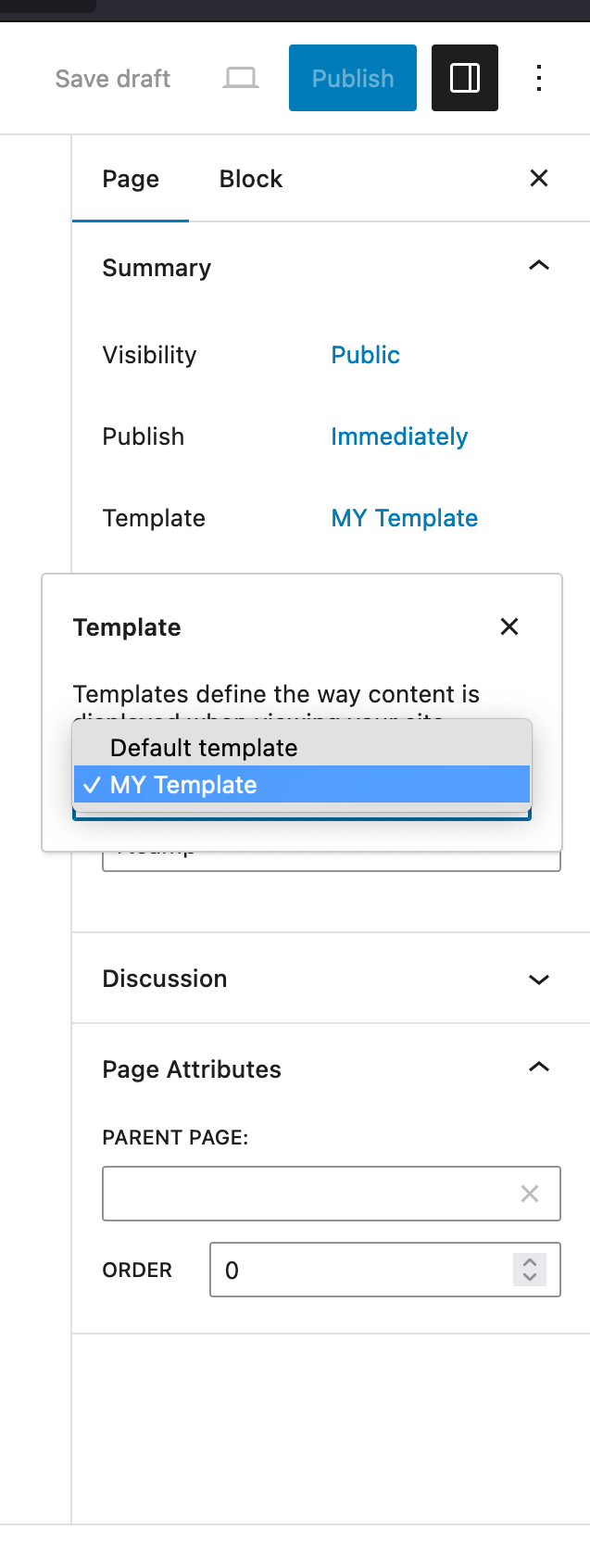
    We can create our own page template for that

    Create a file name it anything like mytemp.php, we don’t have to name it like page-mytemp.php

    <?php /* Template Name: MY Template */ ?>
    

    We can customize this template according to use case and then use it when creating new page.

  • day 22

    • Debug Config
    • Template Hierarchy
    • Tables in multisite

    Before starting with debugging we have to first define this constants in the wp-config.php file

    define( 'WP_DISABLE_FATAL_ERROR_HANDLER', true );   // WP 5.2 and later
    define( 'WP_DEBUG', true );
    define( 'WP_DEBUG_DISPLAY', false );
    define( 'WP_DEBUG_LOG', true );
    

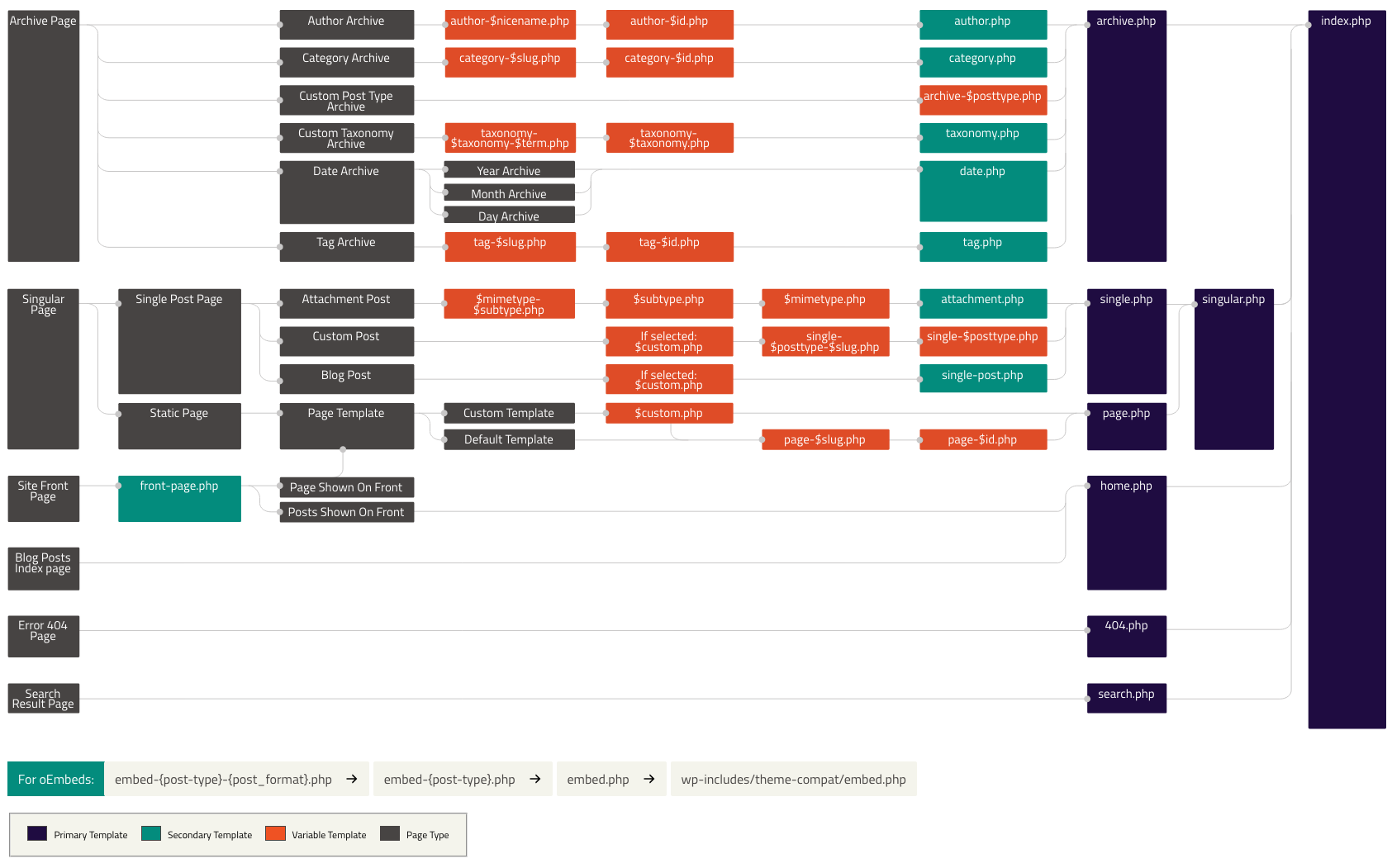
    Template Hierarchy


    WordPress uses templates to display content and there can be many templates depending on the use case for custom post types archives we can create templates and then for a single movie, we can create a template.

    But, for creating a theme we need only one files index.php, so in wordpress template hierarchy index.php is the last one so if no template is found then at last index.php is used.

    Learning about template hierarchy is important as we can then use it to make our own templatates for like custom post types or archive etc

    Tables in Multisite

    When creating a multisite installation of wordpress, few extra tables are added along with default tables.

    • wp_site
    • wp_sitemeta
    • wp_signups
    • wp_blogs
    • wp_blogmeta
    • wp_registration_log
    Single Installation
    Multisite Installation
  • day 21

    • Themes : Do we really need just two files?
    • Themes vs Plugins
    • Query Monitor Plugin

    Themes in wordpress


    After plugin, it is now time to learn about themes, unlike plugins themes do not add any extra functionality to WordPress but change how the site looks.

    Having a good theme that matches with out site intention and goal is must for anyone creating site using WordPress. There are many free themes available but we can also choose to develop our own.

    To start with theme development we need to create two files

    • style.css
    • index.php

    It is not mandatory to keep all you styles and style.css, we can use other organized structure for that but like how in plugin we used the index.php header to let the WordPress know about our plugin, we use the style.css header for theme info

    /*
    Theme Name: Test Theme
    Theme URI: tr.rt.gw
    Author: Me
    Author URI: me.com
    Description: Testing theme
    Version: 0.0.1
    Requires at least: 5.0
    Requires PHP: 7.0
    License: GNU General Public License v2 or later
    License URI: http://www.gnu.org/licenses/gpl-2.0.html
    Text Domain: test-theme
    */
    

    I am using paimo chair theme for this site.

    Theme vs Plugins


    Themes are for representation of our site, its look etc. Plugins we use to add extra functionality.

    We should never use themes to add critical features, always use plugins for that as the official docs suggest. Combined together theme and plugin can really make a very good site like the one we will be making in our course.


    Query Monitor Plugin


    Query monitor plugin is a developer tool we can use to see the database queries our wp site is making. We can use it for debugging our site.

    Not only db queries it can show you PHP errors, API calls, ajax calls, scripts enqueued etc.

    I found it very useful as on my own site, the script was not getting loaded and I couldn’t figure out why.

    We can download the zip for plugin from here

    “Our plugin needs a lot of rework to be done for it to become fully functional and deployable.”

  • END OF WEEK 4

    • Caching in WordPress
    • Select media modal using wp.media

    Caching in WordPress

    If there is query in our code that is taking long to load and hampering the performance of our site, we can incorporate caching.

    We will cache the results instead of firing the query every time which will make our site load faster.

    In our project, to render shortcodes of movie and person according to the attributes we are using meta queries and tax queries.

    There are ways to optimize this queries which will not be covering here, we are focusing on using caching only.

    WordPress provides following methods in class WP_Object_Cache {} for caching,

    We can use output buffer in php, to get the output being put on the site like the movie details and then store that output in our cache

    // ...your code to get posts and filter where meta person = actor
    ob_start() ?>
    <p>the_title()</p>
    <?php $contents = ob_get_contents(): ?>
    

    Then we can get the contents in the buffer and save them to our cache using wp_cache_set()

    &lt;?php
    wp_cache_set("_rt-person-actor",$contents);
    ?&gt;
    

    After this, before running the query we can check if we have it in the cache and return that only

    &lt;?php
    if(wp_cache_get('_rt-person-actor')){
      echo wp_cache_get('_rt-person-actor');
      return; // don't perform queries below
    }
    
    // ...your code to get posts
    

    This will not work though, why ? the wp cache functions store non persistent cache, means once the request is over cache will be removed

    What use of this is then?, we can use persistent cache tool like redis, for that you can use redis cache object plugin


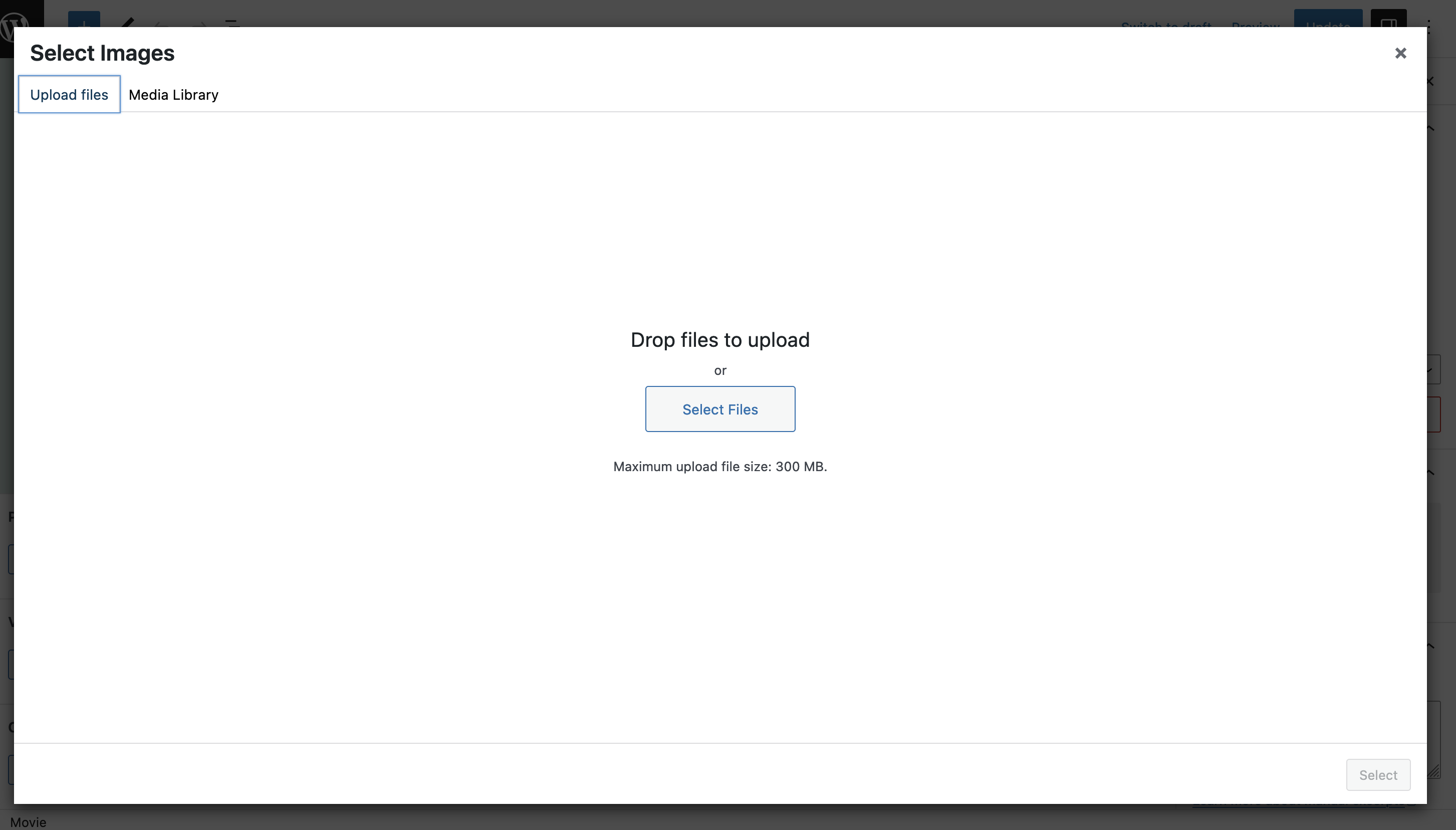
    Select media modal using wp.media

    I create this generic function for mediametaboxes to launch different modal according to which button is clicked

    /*
    This function will be used by meta boxes to display wp.media modal.
     */
    function createMediaFrame( // eslint-disable-line no-unused-vars
    	title,
    	allowMultiple,
    	mediaType,
    	hiddenInputID,
    	callback = null
    ) {
    	// Create a new media frame.
    	const frame = wp.media({
    		title,
    		multiple: allowMultiple,
    		library: { type: mediaType }, // Show only the specified media type in the media library.
    	});
    
    	// Callback when media is selected.
    	frame.on('select', function () {
    		const attachments = frame
    			.state()
    			.get('selection')
    			.map(function (attachment) {
    				return attachment.id;
    			});
    
    		// Update the hidden input with the selected attachment IDs (for form submission).
    		const hiddenInput = document.getElementById(hiddenInputID);
    		hiddenInput.value = attachments.join(',');
    
    		// Execute the custom callback function if provided.
    		if (typeof callback === 'function') {
    			callback(attachments);
    		}
    
    		frame.close();
    	});
    
    	// Open the media frame.
    	frame.open();
    }


    Can be used as

    createMediaFrame(
    'Select Images',// name for the modal
     true, //multiselect
    'image', //type of media
    'rt-media-meta-img-ids');
    
    
  • DAY 19

    Adding Custom Roles
    • add_role() is used to add a custom role
    • to add custom role with same capability as admin but not allow to add edit update delete post we can:
      • get all capabilties for admin
      • from that remove capability for add edit update delete posts
      • create a role and give the modified capability to them.
    
      function add_custom_role(){
    	$capabilities = get_role['administrator']->capabilities;
    	unset($capabilities['publish_posts']);	  
    	unset($capabilities['edit_posts']);	  
    	unset($capabilities['delete_posts']);	  
    	add_role('cannot_manager', 'Cannot Manager', $capabilities);
    	}
    
    
    Adding Custom Capability
    • we can filter hook into the default capabilities and append our custom capability to it
    
    function simple_role_caps() {
    	// Gets the simple_role role object.
    	$role = get_role( 'simple_role' );
    
    	// Add a new capability.
    	$role->add_cap( 'access_admin_menu', true );
    }
    
    // Add simple_role capabilities, priority must be after the initial role definition.
    add_action( 'init', 'simple_role_caps', 11 );
    
    
    • then on admin menu page check :
    
    if (! current_user_can( 'access_admin_menu' ) ) {
    	die("you Don't have access to this page");
    }
    
    map_meta_cap() function
    • It is used to map meta capabilties to primitive capability
    • eg. edit_posts is a primitive capability, we want to add capability like edit_rt_movie which is a meta capabiltiy
    map_meta_cap filter:
    • when map_meta_cap() is called for capability check, it returns the required capabilties.
    • This is where the map_meta_cap filter comes into action, we can use it to set our custom capability.
    
    function custom_map_meta_cap($caps, $cap){
    if('edit_rt_movie' === $cap){
    $caps['edit_post'] = true;
    }
    return $caps;
    }
    add_filter('map_meta_cap', 'custom_map_meta_cap',10,2);
    
  • Day 18

    2–3 minutes

    Generating pot file using WP CLI

    • from local environment, open shell
    • go to your plugin directory and type this
    • type
    $ wp i18n make-pot . languages/my-plugin.pot
    

    Generating machine objects file from po file

    $ wp i18n make-mo movie-library-hi_IN.po languages
    

    Different functions used for i18n

    • __()
      • put the string inside __() to make it translatable
      • eg : __('Add new Movie','movie-library');
    • _e()
      • if the string should echo to the browser then use
      __('Add new Movie','movie-library');
      
    • _n()
      • give both singular and plular form of the string
      _n( 'We deleted %d spam message.', // singular
          'We deleted %d spam messages.', //plural
          $count, 
         'my-text-domain'  )
      
    • _x()
      • Sometimes same word may mean diffrent according to in which context it is used for that this is used.
       _x( 'Attachment', 'A files attached to mail', 'my-text-domain' );
      
    • _ex()
      • Use when we want to combine both _e() and _x()

    array_diff()

    How can we set the info selected by user and remove the user that is unselected in metabox?

    We are only getting the selected ids and not what is unselected, for that we can get previously selected terms, compare them with currently selected and remove the ones that are not present in current.

    For this, I used PHP array_diff() function,

    Compares array against one or more other arrays and returns the values in array that are not present in any of the other arrays.

    First we get the selected ids and create terms

    $all_people = array_merge( $directors, $producers, $writers, $actors );
    $terms = [];
    // Create array of terms to be added now.
    		foreach ( $all_people as $person_id ) {
    			$person      = get_post( $person_id );
    			$term        = $person->post_name . '-' . $person_id;
    			$term_exists = term_exists( $term, '_rt_movie-person' );
    			// Create the term if it does not exists.
    			if ( ! $term_exists ) {
    				wp_insert_term( $term, '_rt-movie-person', [ 'slug' => $term ] );
    			}
    			$terms[] = $term;
    		} // end foreach


    Then we get the terms selected before

    // Get previous terms.
    		$old_terms = wp_get_post_terms( $post_id, '_rt-movie-person', [ 'fields' => 'slug' ] );


    Compare the both using array_diff() and get terms which are not in the current but were there in previous

    // Get unselected Terms.
    		$unselected_terms = array_diff( $old_terms, $terms );
    

    Finally remove the relationship between terms and out post

    		wp_remove_object_terms( $post_id, $unselected_terms, '_rt-movie-person' );


    This way, the term relationship will get deleted when unselected in the metabox


    WPDB – standard way to interact with WordPress database


    wpdb is a class provided by WordPress that has functions to handle database queries without having to write raw SQL.

    • It is used so we can query the wordpress database without having to write raw SQL queries.
    • Create an abstraction layer over the database.
    • Common methods
      1. insert() : insert data into a table
      2. prepare() : prepares sql query to avoid sql injection
      3. update() : to update data in table
      4. delete() : to delete data
  • day 17

    • Namespaces in php
    • PSR-4 autoloader
    • Nonces
    • Shortcodes

    Namespaces in php


    Namespaces in php were introduced with version 5.3, they provide a great way to organize our code and also avoid naming conflicts

    example

    <?php
    namespace main\controller
    
    class Media{
    
    }
    ?>
    
    <?php
    namespace main\view
    
    class Media{
    
    }
    ?>
    

    Today or tommorow in project, we will run out of unique names to give to our classes and functions, so this is a great alternative instead of just prefixing everything.

    PSR-4 Autoloader

    PSR-4 autoloader is a standard that we can use to create our autoloader in the project. It uses nested namespaces and follows a specific directory structure.

    We have to then import the autoloader only once in the main plugin file and we can autoload all our files. As for namespaces we have to use the full class name to access the classes.

    spl_autoload_register(function ($class) {
    
        // project-specific namespace prefix
        $prefix = 'movie_library\\includes';
    
        // base directory for the namespace prefix
        $base_dir = __DIR__;
    
        // does the class use the namespace prefix?
        $len = strlen($prefix);
        if (strncmp($prefix, $class, $len) !== 0) {
            // no, move to the next registered autoloader
            return;
        }
    
        // get the relative class name
        $relative_class = substr($class, $len);
    
        // replace the namespace prefix with the base directory, replace namespace
        // separators with directory separators in the relative class name, append
        // with .php
        $file = $base_dir . str_replace('\\', '/', $relative_class) . '.php';
    
        // if the file exists, require it
        if (file_exists($file)) {
            require $file;
        }
    });
    

    Nonce

    Number used once, nonce is a hash value or some random digits, alphabets that we use to verify requests received are from legit sources and to protect our site from CSRF

    To create nonce we can use wordpress inbuild function wp_create_nonce(). example :

    $nonce = wp_create_nonce('csrf_token');


    Then in our backend code, when we receive any request we can validate this nonce using wp_verifiy_nonce() function.

    function save(){
    if(!(isset($_GET['csrf_token'] && 
    wp_verifiy_nonce($_GET['csrf_token], 'csrf_token) ){
    return;
    }
    
    }
    

    ShortCode API


    Shortcodes in wordpress are used to render some content on the front end dynamically. they are writter as [directors_list]

    The wordpress finds this shorcode if it is registered or not and call the function connected to it which will return some content.

    This content will then be displayed at the place of the shortcode.

    to register a shortcode we have to use:

    function register_shortcodes(){
       add_shortcode('recent-posts', 'directors_list_function');
    }
    

    Then we also have to define the callback which is going to give the content

    function directors_list_function() {
       //logic to get all directors
       return $directors;
    }